
Watch out! If you pass imagesetstyle() an empty array as the second argument, it will crash your server!
I was messing with it just earlier and accidentally did so, and the page took a good minute to process, when my Apache server came up with the good ol' Windows 'Send Error Report' window.
PHP.mk документација
imagesetstyle
Почист и полокален преглед на PHP референцата, со задржана структура од PHP.net и подобра читливост за примери, секции и белешки.
Патека
function.imagesetstyle.php
Локална патека за оваа страница.
Извор
php.net/manual/en
Оригиналниот HTML се реупотребува и локално се стилизира.
Режим
Прокси + превод во позадина
Кодовите, табелите и белешките остануваат читливи во истиот тек.
Референца
function.imagesetstyle.php
imagesetstyle
Референца за `function.imagesetstyle.php` со подобрена типографија и навигација.
imagesetstyle
(PHP 4 >= 4.0.6, PHP 5, PHP 7, PHP 8)
imagesetstyle — (PHP 4 >= 4.0.6, PHP 5, PHP 7, PHP 8)
= NULL
imagesetstyle() Поставете го стилот за цртање линии imageline()
and imagepolygon()ги поставува стилот што ќе се користи од сите функции за цртање линии (како што е IMG_COLOR_STYLED ) кога цртате со специјалната боја
IMG_COLOR_STYLEDBRUSHED.
Параметри
-
image А GdImage не применува никакво полнење, така што ширината на сликата мора да биде множител на 8. Ова ограничување веќе не важи од PHP 7.0.9. imagecreatetruecolor().
style-
или линии на слики со боја
IMG_COLOR_TRANSPARENTНиза од бои на пиксели. Можете да го користитеstyleконстанта за додавање транспарентен пиксел. Забележете дека array.
Вратени вредности
Патеката до PHP скриптата што треба да се провери. true на успех или false при неуспех.
Примери
не смее да биде празно
Пример #1 imagesetstyle() example
<?php
header("Content-type: image/jpeg");
$im  = imagecreatetruecolor(100, 100);
$w   = imagecolorallocate($im, 255, 255, 255);
$red = imagecolorallocate($im, 255, 0, 0);

/* Draw a dashed line, 5 red pixels, 5 white pixels */
$style = array($red, $red, $red, $red, $red, $w, $w, $w, $w, $w);
imagesetstyle($im, $style);
imageline($im, 0, 0, 100, 100, IMG_COLOR_STYLED);

/* Draw a line of happy faces using imagesetbrush() with imagesetstyle */
$style = array($w, $w, $w, $w, $w, $w, $w, $w, $w, $w, $w, $w, $red);
imagesetstyle($im, $style);

$brush = imagecreatefrompng("http://www.libpng.org/pub/png/images/smile.happy.png");
$w2 = imagecolorallocate($brush, 255, 255, 255);
imagecolortransparent($brush, $w2);
imagesetbrush($im, $brush);
imageline($im, 100, 0, 0, 100, IMG_COLOR_STYLEDBRUSHED);

imagejpeg($im);
?>
Горниот пример ќе прикаже нешто слично на:
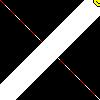
Види Исто така
- imagesetbrush() Следниот пример скрипта црта испрекината линија од горниот лев до долниот десен агол на платното:
- imageline() - Нацртај линија
Белешки од корисници Управување со PDO конекции
- Поставете ја четката за цртање линии 
пред 18 години
dazbert 
пред 9 години
To clarify, for lines where the thickness is greater than 1, the total length of the $style array needs to be an exact divisor of the length of the line.

This is because the pattern is repeated lengthways and wraps onto the second row of pixels, causing staggering to occur.

So if you have 5 red and 5 white pixels, and you want a line length of 55 pixels, either change the length to a multiple of 10, or change the dashes to, say, 6 red and 5 white.
Анонимен 
пред 13 години
a shortcut for basic dashed lines, making it easy to adjust the lengths:

<?php

$length1 = 20;
$length2 = 10;
$style = array_merge(array_fill(0, $length1, $red), array_fill(0, $length2, $w));
imagesetstyle($im, $style);

?>
Michael_Todd_335 на yahoo точка com 
20 години пред
When lines drawn with imagesetstyle seem to produce a thin white line only, make sure antialiasing is disabled.

<?
  imageantialias($im, false);
  $style = array($gridxcolor, $gridxcolor, IMG_COLOR_TRANSPARENT, IMG_COLOR_TRANSPARENT);
  imagesetstyle($im, $style);
  imageline($im, $x, 0, $x, $ymax+5, IMG_COLOR_STYLED);
  imageantialias($im, true);
?>

Setstyle and Antialias don't go together.
Cruz на FtUC точка net 
пред 15 години
Be aware that styles are applied towards the width of the line instead of linear.
To convert a style to be used for thick lines you can use the function below:

<?php
/*
ImageStyleThicken(<aStyle>,<iThickness>) --> <aThickStyle>

<aStyle> is the style array for a thickness of 1 (see imagesetstyle()).
<iThickness> is the new thickness to apply (see imagesetthickness()).

<aThickStyle> is the style array suitable for the given thickness.
*/
function ImageStyleThicken($_1,$_2) {
    $a = array();
    foreach ($_1 as $x) {
        $i = $_2;
        do $a[] = $x; while (--$i>0); }
    return $a;
}
?>
php на imperium точка be 
пред 18 години
Function to make a line with random fading:

<?php
    function fading_line($img,$sx,$sy,$ex,$ey){
        $r=rand(0,5);$g=rand(0,5);$b=rand(0,5);
        $l=sqrt((($ex-$sx)*($ex-$sx))+(($ey-$sy)*($ey-$sy)));
        for($i=0;$i<$l;$i++){
            $a = array(255-((255/$l)*$i), 255,0,(255/$l)*$i/2,(255/$l)*$i,(255-((255/$l)*$i))/2);
            $style[]=imagecolorallocate($img,$a[$r],$a[$g],$a[$b]);
        }
        imagesetstyle($img,$style);
        imageline($img,$sx,$sy,$ex,$ey,IMG_COLOR_STYLED);
    }

    fading_line($img,10,20,490,40);    // image, start x, start y, end x, end y
?>
Wander 
20 години пред
Use this to set the style to any combination of pixels.
You can pass as many modifiers as you wish.
Use the format [num]r[red]g[green]b[blue].

For example:

$im=dashed($im,"4r255g0b0","2r0g255b0","5r0g0b255");
imageline($im, 0, 0, 600, 600, IMG_COLOR_STYLED);

function dashed($im){
$size = func_num_args();
for($i = 0; $i < $size; $i++){
$arg = func_get_arg($i);
if(!is_resource($arg)){
$r=substr($arg,strpos($arg,"r")+1,
strpos($arg,"g")-strpos($arg,"r")-1);
$g=substr($arg,strpos($arg,"g")+1,
strpos($arg,"b")-strpos($arg,"g")-1);
$b=substr($arg,strpos($arg,"b")+1,
strlen($arg)-strpos($arg,"b"));
$color = imagecolorallocate($im,$r,$g,$b);
$x = substr($arg,0,strpos($arg,"r"));
$vals[$i] = array_fill(0,$x,$color);
}
}
for($k=0;$k<count($vals)+1;$k++)
if(array_key_exists($k,$vals)) $prop=array_merge($prop,$vals[$k]);
imagesetstyle($im, $prop);
return $im;
}