
imagesetstyle() sets the style to be used by all line drawing functions when drawing with the special color .
Here goes a example of drawing a dashed-line circle.enjoy!
<?php
header("Content-type: image/jpeg");
$im = imagecreate(100,100);
$b = imagecolorallocate ($im, 0, 0, 0);
$w = imagecolorallocate ($im, 255, 255, 255);
$style = array ($b,$b,$b,$b,$b,$w,$w,$w,$w,$w);
imagesetstyle ($im, $style);
imagearc($im,50,50,100,100,0,360,IMG_COLOR_STYLED);
imagejpeg($im);
imagedestroy($im);
?>
PHP.mk документација
imagearc
Почист и полокален преглед на PHP референцата, со задржана структура од PHP.net и подобра читливост за примери, секции и белешки.
Патека
function.imagearc.php
Локална патека за оваа страница.
Извор
php.net/manual/en
Оригиналниот HTML се реупотребува и локално се стилизира.
Режим
Прокси + превод во позадина
Кодовите, табелите и белешките остануваат читливи во истиот тек.
Референца
function.imagearc.php
imagearc
Референца за `function.imagearc.php` со подобрена типографија и навигација.
imagearc
(PHP 4, PHP 5, PHP 7, PHP 8)
imagearc — Црта лак
= NULL
imagearc(
GdImage
int
int
int
int
int
int
int
): true
GdImage
$image,int
$center_x,int
$center_y,int
$width,int
$height,int
$start_angle,int
$end_angle,int
$color): true
imagearc() црта лак од круг со центар во дадените координати.
Параметри
-
image А GdImage не применува никакво полнење, така што ширината на сликата мора да биде множител на 8. Ова ограничување веќе не важи од PHP 7.0.9. imagecreatetruecolor().
center_x-
x-координата на центарот.
center_y-
y-координата на центарот.
width-
Ширина на лакот.
height-
Висина на лакот.
start_angle-
Аголот на почеток на лакот, во степени.
end_angle-
Аголот на крај на лакот, во степени. 0° е на позицијата три часот, а лакот се црта во насока на стрелките на часовникот.
color-
Низата што треба да се напише. imagecolorallocate().
Вратени вредности
Секогаш враќа true.
Дневник на промени
| Верзија | = NULL |
|---|---|
| 8.0.0 |
image беше вратено при неуспех. GdImage
инстанца сега; претходно, валидна gd resource се очекуваше.
|
Примери
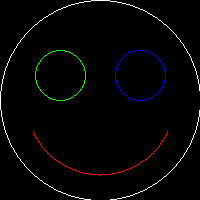
Пример #1 Цртање круг со imagearc()
<?php

// create a 200*200 image
$img = imagecreatetruecolor(200, 200);

// allocate some colors
$white = imagecolorallocate($img, 255, 255, 255);
$red   = imagecolorallocate($img, 255,   0,   0);
$green = imagecolorallocate($img,   0, 255,   0);
$blue  = imagecolorallocate($img,   0,   0, 255);

// draw the head
imagearc($img, 100, 100, 200, 200,  0, 360, $white);
// mouth
imagearc($img, 100, 100, 150, 150, 25, 155, $red);
// left and then the right eye
imagearc($img,  60,  75,  50,  50,  0, 360, $green);
imagearc($img, 140,  75,  50,  50,  0, 360, $blue);

// output image in the browser
header("Content-type: image/png");
imagepng($img);

?>
Горниот пример ќе прикаже нешто слично на:
Види Исто така
- imagefilledarc() - Нацртај делумен лак и исполни го
- imageellipse() - Нацртај елипса
- imagefilledellipse() - Нацртај исполнета елипса
Белешки од корисници 20 белешки
jinny на 263 dot net 
пред 23 години
chandlerklebs на gmail dot com 
пред 14 години
This is an example script I wrote for myself to help me learn how to used the imagearc functions. Maybe if will also help others.

<?php
//example PHP script of imagearc functions
$image_width=360;$image_height=360;
$img = imagecreatetruecolor($image_width,$image_height); //make image variable

//create a background color by making a filled rectangle
$color = imagecolorallocate($img,255,255,255);
imagefilledrectangle($img,0,0,$image_width,$image_height,$color);

$r=$image_width/2 - $image_width/32 ; //radius
$cx=$image_width/2;
$cy=$image_height/2;

$color = imagecolorallocate($img,0,0,0);
imagearc($img, $cx, $cy, $r*2, $r*2,  0, 360, $color); //regular outlines arc

imagefilledarc($img, $cx, $cy, $r*1, $r*1,  0, 90, $color,IMG_ARC_CHORD); //filled triangle with chord of circle
imagefilledarc($img, $cx, $cy, $r*1, $r*1,  180, 270, $color,IMG_ARC_PIE); //pie slice

$font_number=5; //can use built in fonts numbered 1 to 5
$string="Hello world!";
imagestring($img, $font_number, $cx-(imagefontwidth($font_number)*strlen($string))/2, $cy-120, $string, $color);

header("Content-type: image/png");
imagepng($img);// output image in the browser

$filename="imagearc";
imagepng($img,"./frames/$filename.png",9); //make highly compressed png

imagedestroy($img);
?>
eamon на hostelworld dot com 
пред 22 години
Right...
possibly the easiest way of drawing a filled circle:
Loop through the imagearc function incrementing the diameter by one pixel:
<?
 // --- code fragment --- //

for($i=1; $i<$Diameter; $i++){
  imagearc($Image, $CenterX, $CenterY, $i, $i, $Start, $End, $Color);
}

// --------------------- //

?>

This works great for circles with diameters up to about 60 or 70 pixels wide. After that, you start to get pixle gaps.
cleverphp 
пред 7 години
imagearc example works not well,as it lacks of this line
"$white = imagecolorallocate($img, 255, 255, 255);
    imagefill($img,0,0,$white);
    $black = imagecolorallocate($img, 0, 0, 0);
"
marc на resiteit dot com 
figroc at gmail dot com
Round cornered anti-aliased dynamically sized button.

$w=40;
$h=20;
$im = ImageCreate($w,$h);
$white=ImageColorAllocate($im,255,255,255);
ImageFilledRectangle($im,0,0,$w,$h,$white);
imagecolortransparent ($im, $white);
ImageTTFText ($im, $h+ceil($h/3)+1, 0, -1, $h-1, $col1, "arialbd.ttf", "O");
ImageTTFText ($im, $h+ceil($h/3)+1, 0, $w-$h, $h-1, $col1, "arialbd.ttf", "O");
ImageTTFText ($im, $h+ceil($h/3)+1, 0, 1, $h-1, $col1, "arialbd.ttf", "O");
ImageTTFText ($im, $h+ceil($h/3)+1, 0, $w-$h-2, $h-1, $col1, "arialbd.ttf", "O");
$points=array(
    1,round($h/2),
    round($h/4),$h-round($h/4),
    round($h/2),$h,
    $w-(round($h/2)),$h,
    $w-(round($h/4)),$h-round($h/4),
    $w-2,round($h/2),
    $w-round($h/4),round($h/4),
    $w-round($h/2),0,
    round($h/2),0,
    round($h/4),round($h/4)
);
imagefilledpolygon ($im, $points, 10, $col1);

header("content-type: image/gif");
header("Content-Disposition: filename=name.gif");
ImageGif($im);
ImageDestroy($im);
jerryscript на aol dot com 
пред 22 години
[note-Apache/1.3.29 (Win32) PHP/4.3.4]

The imagearc (and imageellipse) functions do not accept line thicknesses when drawn from 0 to 360 degrees.

Drawing from 0 to 359 and again from 359 to 360 does create an ellipse with the current line thickness.

Jerry
foripepe на yahoo dot com 
figroc at gmail dot com
To fill an arc (DiameterX != DiameterY):

<?
function imagefilledarc($Image, $CenterX, $CenterY, $DiameterX, $DiameterY, $Start, $End, $Color) {
    // To draw the arc
    imagearc($Image, $CenterX, $CenterY, $DiameterX, $DiameterY, $Start, $End, $Color);
    // To close the arc with 2 lines between the center and the 2 limits of the arc
    $x = $CenterX + (cos(deg2rad($Start))*($DiameterX/2));
    $y = $CenterY + (sin(deg2rad($Start))*($DiameterY/2));
    imageline($Image, $x, $y, $CenterX, $CenterY, $Color);
    $x = $CenterX + (cos(deg2rad($End))*($DiameterX/2));
    $y = $CenterY + (sin(deg2rad($End))*($DiameterY/2));
    imageline($Image, $x, $y, $CenterX, $CenterY, $Color);
    // To fill the arc, the starting point is a point in the middle of the closed space
    $x = $CenterX + (cos(deg2rad(($Start+$End)/2))*($DiameterX/4));
    $y = $CenterY + (sin(deg2rad(($Start+$End)/2))*($DiameterY/4));
    imagefilltoborder($Image, $x, $y, $Color, $Color);
}
?>

To close the arc with 2 lines (DiameterX != DiameterY):

<?
function imagenofilledarc($Image, $CenterX, $CenterY, $DiameterX, $DiameterY, $Start, $End, $Color) {
    // To draw the arc
    imagearc($Image, $CenterX, $CenterY, $DiameterX, $DiameterY, $Start, $End, $Color);
    // To close the arc with 2 lines between the center and the 2 limits of the arc
    $x = $CenterX + (cos(deg2rad($Start))*($DiameterX/2));
    $y = $CenterY + (sin(deg2rad($Start))*($DiameterY/2));
    imageline($Image, $x, $y, $CenterX, $CenterY, $Color);
    $x = $CenterX + (cos(deg2rad($End))*($DiameterX/2));
    $y = $CenterY + (sin(deg2rad($End))*($DiameterY/2));
    imageline($Image, $x, $y, $CenterX, $CenterY, $Color);
}
?>

An example:
<?
    $destImage = imagecreate( 216, 152 );
    $c0 = imagecolorallocate( $destImage, 0, 255, 255 );
    $c1 = imagecolorallocate( $destImage, 0, 0, 0 );
    $c2 = imagecolorallocate( $destImage, 255, 0, 0 );
    ImageFilledRectangle ( $destImage, 0, 0, 216, 152, $c0 );
    imagefilledarc( $destImage, 108, 76, 180, 80, 0, 130, $c1 );
    imagenofilledarc( $destImage, 108, 76, 180, 80, 0, 130, $c2 );
    header("content-type: image/PNG");
    ImagePNG( $destImage );
    ImageDestroy( $destImage );
?>
travis на duluth dot com 
ian at eiloart dot com
The wierd thing is that the first two integers tell where to place the "circle".
So for example I first create the "pallet" to place the circle on.
$image = imagecreate(500, 500);
(this makes a huge 500x500 gif :) )
$colorBody = imagecolorallocate($image, 0, 0, 0);
(make the default color of the "pallet" black
$circleColor = imagecolorallocate($image, 255, 0, 255);
(going to make the circle an ugly pink color)
imagearc($image, 250, 250, 300, 300, 0, 360, $circleColor);
Places the image in the center (250,250) and the circle is 300 pixels in diameter.

Hope this helps.

Travis Kent Beste
joe dot tym на gmail dot com 
пред 13 години
I didn't have much luck with the other two functions, one of them makes circles that look like they've been printed on a dot-matrix printer. This simple function builds a border out of circles, seems to work nicely.

<?php
function imagearcunfilled($image,$x,$y,$width,$height,$border_thickness, $color) {

        imagesetthickness($image, 1);

        $x_radius = $width / 2;
        $y_radius = $height / 2;

        for ($i = 0; $i < 360; $i++) {
                if (TRUE) {
                        $x2 = $x + cos($i) * $x_radius;
                        $y2 = $y + sin($i) * $y_radius;
                        imagefilledarc($image,$x2,$y2,$border_thickness,$border_thickness,0,360,$color,IMG_ARC_PIE);
                }
        }
}
?>
mojiro на awmn dot net 
20 години пред
A previous for the Rotated (Filled)Ellipse note from(nojer2 at yahoo dot com, 02-Apr-2001 12:06) has a mistake, at the second arc. Replace them with the following listing.

if ($filled) {
    triangle($im, $cx, $cy, $cx+$px, $cy+$py, $cx+$x, $cy+$y, $colour);
    triangle($im, $cx, $cy, $cx-$px, $cy-$py, $cx-$x, $cy-$y, $colour);
} else {
    imageline($im, $cx+$px, $cy+$py, $cx+$x, $cy+$y, $colour);
    imageline($im, $cx-$px, $cy-$py, $cx-$x, $cy-$y, $colour);
}
Анонимен 
пред 23 години
Please note that in order to draw a complete circle or ellipse (without using the imageellipse) you mustn't use 0? for both s and e. If you do this you will get, umm, nothing. Instead set s to 0? and e to 360? to get a complete circle or ellipse.
nojer2 на yahoo dot com 
figroc at gmail dot com
Here's the function to draw rotated ellipses again. This time I've optimised it a bit, fixed the no-fill bug, and used a 'squishratio' rather than a 'radiusmodifier', to make the curves perfect, so ignore my previous version.

<?php
function rotatedellipse($im, $cx, $cy, $width, $height, $rotateangle, $colour, $filled=true) {
   $step=2;
   $cosangle=cos(deg2rad($rotateangle));
   $sinangle=sin(deg2rad($rotateangle));

   $squishratio = $height/$width;
   $nopreviouspoint = true;
   for ($angle=0; $angle<=(180+$step); $angle+=$step) {

      $ox = ($width * cos(deg2rad($angle)));
      $oy = ($width * sin(deg2rad($angle))) * $squishratio;

      $x =  + (($ox * $cosangle) - ($oy * $sinangle));
      $y = $centrey + (($ox * $sinangle) + ($oy * $cosangle));

      if ($nopreviouspoint) {
        $px=$x;
        $py=$y;
        $nopreviouspoint=false;
      }

      if ($filled) {
         triangle($im, $cx, $cy, $cx+$px, $cy+$py, $cx+$x, $cy+$y, $colour);
         triangle($im, $cx, $cy, $cx-$px, $cx-$py, $cx-$x, $cy-$y, $colour);
      } else {
         imageline($im, $cx+$px, $cy+$py, $cx+$x, $cy+$y, $colour);
         imageline($im, $cx-$px, $cx-$py, $cx-$x, $cy-$y, $colour);
      }
      $px=$x;
      $py=$y;
   }
}

function triangle($im, $x1,$y1, $x2,$y2, $x3,$y3, $colour) {
   $coords = array($x1,$y1, $x2,$y2, $x3,$y3);
   imagefilledpolygon($im, $coords, 3, $colour);
}
?>
timothyhouck на yahoo dot com 
yasuo_ohgaki at hotmail dot com
To do filled arcs, try something like this:

<?php
$diameter = 50;
imagearc($image, 25, 25, $diameter, $diameter, $start, $end, $color);
while($diameter > 0) {
  imagearc($image, 25, 25, $diameter, $diameter, $start, $start + 1, $color);
  imagearc($image, 25, 25, $diameter, $diameter, $end - 1, $end, $color);
  $diameter--;
}
?>

...well you get the point.  It's a kludge, and *very* slow, but it's free.
nojer2 на yahoo dot com 
figroc at gmail dot com
Here's a dashed circle function:

<?php
function dashedcircle($im, $cx, $cy, $radius, $colour, $dashsize=5) {

   $dash=false;
   for ($angle=0; $angle<=(180+$dashsize); $angle+=$dashsize) {
      $x = ($radius * cos(deg2rad($angle)));
      $y = ($radius * sin(deg2rad($angle)));

      if ($dash) {
         imageline($im, $cx+$px, $cy+$py, $cx+$x, $cy+$y, $colour);
         imageline($im, $cx-$px, $cx-$py, $cx-$x, $cy-$y, $colour);
      }
      $dash=!$dash;
      $px=$x;
      $py=$y;
   }
}
?>
anton dot vandeghinste на telenet dot be 
пред 16 години
I needed an arc with a thick border and i didn't like to use 359.9 as end angle so i made a function that works pretty well:

<?php
function imagearcthick($image, $x, $y, $w, $h, $s, $e, $color, $thick = 1)
{
    if($thick == 1)
    {
        return imagearc($image, $x, $y, $w, $h, $s, $e, $color);
    }
    for($i = 1;$i<($thick+1);$i++)
    {
        imagearc($image, $x, $y, $w-($i/5), $h-($i/5),$s,$e,$color);
        imagearc($image, $x, $y, $w+($i/5), $h+($i/5), $s, $e, $color);
    }
}
?>
lucas dot delmas на live dot fr 
12 години пред
The imagearc function has a precision of one degree. The function truncates the $start and $end values to the inferior degree.

For example if the starting angle you calculated is : -178.62450462172°
and the ending angle is : -152.78056427917°
imagearc will draw a curve from -178° to -152°.

If you need accurate curves drawing, you need to use a loop to draw little step-by-step lines. By creating a large number of short enough lines, you will create the impression of a curve with accuracy.
ajim1417 на gmail dot com 
пред 16 години
I wrote a simple function that can draws an arc counter-clockwisekly. Here it is :

<?php

function imagearcCC(&$im, $cx, $cy, $w, $h, $s, $e, $c) {
$start = 360 - $e;
$end = 360 - $s;
return imagearc($im, $cx, $cy, $w, $h, $start, $end, $c);
}

?>

The params of this function is exactly the same as the usual imagearc function.
logang на deltatee dot com 
пред 22 години
Heres a function to make a curve between two points... This will be a downward curve but it wouldn't be hard to make a similar function to make an upward curve. The first point has to be to the left of the second point ($x1 < $x2), and height is actually backwards. The larger height is the less of a crest the curve has. I imagine with a few modifications this functions could make upward curves as well.

function ImageCurveDown ($image, $x1, $y1, $x2, $y2, $height, $color) {
    $presicion = 1;

    for ($left = ($x1-$x2); $left < 0; $left++){
        if ($y1 < $y2) {
            $cy = $y2 + $height;
            $cx = $x1 - $left;
        } else {
            $cy = $y1 + $height;
            $cx = $x2 + $left;
        }
        $nx1 = abs($x1 - $cx);
        $ny1 = abs($y1 - $cy);
        $nx2 = abs($x2 - $cx);
        $ny2 = abs($y2 - $cy);

        if ($y1 < $y2) {
            if ($nx2 == 0 || $ny1 == 0) continue;
            $angle1 = atan($height/$nx2);
            $A1 = $nx2/cos ($angle1);
            $B1 = $ny2/sin ($angle1);
            $angle2 = pi()/2 +atan($left/$ny1);
            $A2 = $nx1/cos ($angle2);
            $B2 = $ny1/sin ($angle2);
        } else {
            if ($ny2 == 0 || $nx1 == 0) continue;
            $angle1 = atan($ny2/$nx2);
            $A1 = abs($nx2/cos ($angle1));
            $B1 = abs($ny2/sin ($angle1));
            $angle2 = atan($height/$nx1);
            $A2 = abs ($nx1/cos ($angle2));
            $B2 = abs($ny1/sin ($angle2));
        }

        if (abs($A1 - $A2) < $presicion && abs ($B1 - $B2) < $presicion) {
            ImageArc($image, $cx, $cy, $A1*2, $B1*2, 180+rad2deg($angle2), 360-rad2deg($angle1), $color);
        }
    }
}
arve на skogvold dot as 
figroc at gmail dot com
I found a better way for drawing a pie chart:

header ("Content-type: image/png");
$diameter = 100;
$radius = $diameter / 2;
$centerX = $radius;
$centerY = $radius;

$im = @ImageCreate ($diameter, $diameter)
    or die ("Cannot Initialize new GD image stream");

$background = ImageColorAllocate ($im, 0, 0, 0);
$red = ImageColorAllocate ($im, 176, 0, 0);

function fill_arc($start, $end, $color) {
    global $diameter, $centerX, $centerY, $im, $radius;
    imagearc($im, $centerX, $centerY, $diameter, $diameter, $start, $end, $color);
    imageline($im, $centerX, $centerY, $centerX + cos(deg2rad($start)) * $radius, $centerY + sin(deg2rad($start)) * $radius, $color);
    imageline($im, $centerX, $centerY, $centerX + cos(deg2rad($end)) * $radius, $centerY + sin(deg2rad($end)) * $radius, $color);
    imagefill ($im,$centerX + $radius * 0.5 *cos(deg2rad($start+($end-$start)/2)), $centerY + $radius * 0.5 * sin(deg2rad($start+($end-$start)/2)), $color);
    }


fill_arc(0,30,$red);
// Will make a red filled arc, starting at 0 degrees, ending at 30 degrees

ImagePng ($im);
cbriou на orange-art dot fr 
yasuo_ohgaki at hotmail dot com
There is another way to fill an arc :

<?php
// To draw the arc
$Color = imagecolorallocate($Image, $Red, $Green, $Blue);
imagearc($Image, $CenterX, $CenterY, $Diameter, $Diameter, $Start, $End, $Color);
// To close the arc with 2 lines between the center and the 2 limits of the arc
$x = $CenterX + (cos(deg2rad($Start))*($Diameter/2));
$y = $CenterY + (sin(deg2rad($Start))*($Diameter/2));
imageline($Image, $x, $y, $CenterX, $CenterY, $Color);
$x = $CenterX + (cos(deg2rad($End))*($Diameter/2));
$y = $CenterY + (sin(deg2rad($End))*($Diameter/2));
imageline($Image, $x, $y, $CenterX, $CenterY, $Color);
// To fill the arc, the starting point is a point in the middle of the closed space
$x = $CenterX + (cos(deg2rad(($Start+$End)/2))*($Diameter/4));
$y = $CenterY + (sin(deg2rad(($Start+$End)/2))*($Diameter/4));
imagefilltoborder($Image, $x, $y, $Color, $Color);
?>