
Please pay attention if you want to draw pixel perfect rectangles: Since this function uses absolute values for the second coordinate points (instead of width and height), you might face a logical problem. PHP counts from 0. But a pixel at position 0,0 occupies already a 1x1 space. In the example above you have the following line:
imagerectangle($canvas, 50, 50, 150, 150, $pink);
If you don't pay attention, you might thing that the difference between the two coordinates is exactly 100 and assume that the drawn rectangle would have the dimension of 100 x 100 pixels too. But it would be 101 x 101, because PHP counts from 0 and imagerectangle() uses absolute coordinates for the second point too. A smaller example: A rectangle with coordinates 0,0 and 5,5 means 0,1,2,3,4,5 which are 6 pixels, not 5.
PHP.mk документација
imagerectangle
Почист и полокален преглед на PHP референцата, со задржана структура од PHP.net и подобра читливост за примери, секции и белешки.
Патека
function.imagerectangle.php
Локална патека за оваа страница.
Извор
php.net/manual/en
Оригиналниот HTML се реупотребува и локално се стилизира.
Режим
Прокси + превод во позадина
Кодовите, табелите и белешките остануваат читливи во истиот тек.
Референца
function.imagerectangle.php
imagerectangle
Референца за `function.imagerectangle.php` со подобрена типографија и навигација.
imagerectangle
(PHP 4, PHP 5, PHP 7, PHP 8)
imagerectangle — Нацртај правоаголник
= NULL
imagerectangle() креира правоаголник почнувајќи од наведените координати.
Параметри
-
image А GdImage не применува никакво полнење, така што ширината на сликата мора да биде множител на 8. Ова ограничување веќе не важи од PHP 7.0.9. imagecreatetruecolor().
x1-
Горна лева x координата.
y1-
Горна лева y координата. 0, 0 е горниот лев агол на сликата.
x2-
Долна десна x координата.
y2-
Долна десна y координата.
color-
Низата што треба да се напише. imagecolorallocate().
Вратени вредности
Секогаш враќа true.
Дневник на промени
| Верзија | = NULL |
|---|---|
| 8.0.0 |
image беше вратено при неуспех. GdImage
инстанца сега; претходно, валидна gd resource се очекуваше.
|
Примери
Пример #1 Едноставен imagerectangle() example
<?php
// Create a 200 x 200 image
$canvas = imagecreatetruecolor(200, 200);

// Allocate colors
$pink = imagecolorallocate($canvas, 255, 105, 180);
$white = imagecolorallocate($canvas, 255, 255, 255);
$green = imagecolorallocate($canvas, 132, 135, 28);

// Draw three rectangles each with its own color
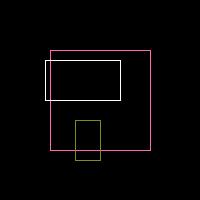
imagerectangle($canvas, 50, 50, 150, 150, $pink);
imagerectangle($canvas, 45, 60, 120, 100, $white);
imagerectangle($canvas, 100, 120, 75, 160, $green);

// Output
header('Content-Type: image/jpeg');
imagejpeg($canvas);
?>
Горниот пример ќе прикаже нешто слично на:
Белешки од корисници 3 белешки
randolphothegreat at yahoo dot com 
пред 10 години
rogier 
пред 18 години
In addition to Corey's note, this is the kind of code he means. Note that I always draw an outer grid border, so drawing lines will always take
1 + ceil((rows+cols)/2) actions. For a 20X20 grid, this means 21 actions, a 10X25 grid takes 19 Actions

<?php

function draw_grid(&$img, $x0, $y0, $width, $height, $cols, $rows, $color) {
    //draw outer border
    imagerectangle($img, $x0, $y0, $x0+$width*$cols, $y0+$height*$rows, $color);
    //first draw horizontal
    $x1 = $x0;
    $x2 = $x0 + $cols*$width;
    for ($n=0; $n<ceil($rows/2); $n++) {
        $y1 = $y0 + 2*$n*$height;
        $y2 = $y0 + (2*$n+1)*$height;
        imagerectangle($img, $x1,$y1,$x2,$y2, $color);
    }
    //then draw vertical
    $y1 = $y0;
    $y2 = $y0 + $rows*$height;
    for ($n=0; $n<ceil($cols/2); $n++) {
        $x1 = $x0 + 2*$n*$width;
        $x2 = $x0 + (2*$n+1)*$width;
        imagerectangle($img, $x1,$y1,$x2,$y2, $color);
    }
}

//example
$img = imagecreatetruecolor(300, 200);
$red   = imagecolorallocate($img, 255,   0,   0);
draw_grid($img, 0,0,15,20,20,10,$red);
header("Content-type: image/png");
imagepng($img);
imagedestroy($img);
?>
have fun ;)
eustaquiorangel at yahoo dot com 
пред 23 години
If you want an empty rectangle, I mean, just the borders, fill it first with the ImageFilledRectangle function with the background color and then draw it with this function.