
The bug reported by 'michi at marel dot at' also exists in PHP version 5.1.1. This functions just works with vertical lines!
PHP.mk документација
imagedashedline
Почист и полокален преглед на PHP референцата, со задржана структура од PHP.net и подобра читливост за примери, секции и белешки.
Патека
function.imagedashedline.php
Локална патека за оваа страница.
Извор
php.net/manual/en
Оригиналниот HTML се реупотребува и локално се стилизира.
Режим
Прокси + превод во позадина
Кодовите, табелите и белешките остануваат читливи во истиот тек.
Референца
function.imagedashedline.php
imagedashedline
Референца за `function.imagedashedline.php` со подобрена типографија и навигација.
imagedashedline
(PHP 4, PHP 5, PHP 7, PHP 8)
imagedashedline — Нацртај испрекината линија
= NULL
Оваа функција е застарена. Користете комбинација од imagesetstyle() and imageline() instead.
Параметри
-
image А GdImage не применува никакво полнење, така што ширината на сликата мора да биде множител на 8. Ова ограничување веќе не важи од PHP 7.0.9. imagecreatetruecolor().
x1-
Горна лева x координата.
y1-
Горна лева y координата. 0, 0 е горниот лев агол на сликата.
x2-
Долна десна x координата.
y2-
Долна десна y координата.
color-
Бојата на границата. Идентификатор на боја создаден со imagecolorallocate().
Вратени вредности
Секогаш враќа true.
Дневник на промени
| Верзија | = NULL |
|---|---|
| 8.0.0 |
image беше вратено при неуспех. GdImage
инстанца сега; претходно, валидна gd resource се очекуваше.
|
Примери
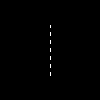
Пример #1 imagedashedline() example
<?php
// Create a 100x100 image
$im = imagecreatetruecolor(100, 100);
$white = imagecolorallocate($im, 0xFF, 0xFF, 0xFF);

// Draw a vertical dashed line
imagedashedline($im, 50, 25, 50, 75, $white);

// Save the image
imagepng($im, './dashedline.png');
?>
Горниот пример ќе прикаже нешто слично на:
Пример #2 Алтернатива за imagedashedline()
<?php
// Create a 100x100 image
$im = imagecreatetruecolor(100, 100);
$white = imagecolorallocate($im, 0xFF, 0xFF, 0xFF);

// Define our style: First 4 pixels is white and the
// next 4 is transparent. This creates the dashed line effect
$style = Array(
                $white,
                $white,
                $white,
                $white,
                IMG_COLOR_TRANSPARENT,
                IMG_COLOR_TRANSPARENT,
                IMG_COLOR_TRANSPARENT,
                IMG_COLOR_TRANSPARENT
                );

imagesetstyle($im, $style);

// Draw the dashed line
imageline($im, 50, 25, 50, 75, IMG_COLOR_STYLED);

// Save the image
imagepng($im, './imageline.png');
?>
Види Исто така
- imagesetstyle() - Поставете го стилот за цртање линии
- imageline() - Нацртај линија
Белешки од корисници 5 белешки
ProfessorNeo на gmx точка de 
20 години пред
ihsanduvac на gmail точка com 
пред 13 години
It doesn't work for horizontal lines. Use imagesetstyle()
tgabor72 на freemail точка hu 
пред 15 години
You can use the imagepatternedline() function with extra features instead of imagedashedline() to give a visible dashedlines and other any kind of patterned lines on your images. The routine also manages the thickness of the line. Have fun!

<?php
// imagepatternedline() function
// Routine was developed to draw any kind of straight line with thickness. Routine uses imageline() function to draw line.
// Parameters are (similar to imageline() function):
//   $image: (resource) imagefile
//   $xstart, $ystart: (int) x,y coordinates for first point
//   $xend, $yend: (int) x,y coordinates for last point
//   $color: (int) color identifier that created with imagecolorallocate()
// extra parameters:
//   $thickness: (int) thickness of line in pixel
//   $pattern: (string) pattern of line, which repeats continuously while line is being drawed.
//   If there is '1' in the pattern that means the actual dot of line is visible,
//   '0' means dot is not visible (space between two line elements).
//   All characters regard for one pixel. Default: 1 dot wide dashed line with 4-4 dots and spaces.
// Examples for pattern:
// "1" or "" continuous line
// "10" close dotline
// "10000" dotline
// "111111110000001100000011111111" dotline for design drawing
// "111111111100000011000000110000001111111111" double dotline
// some examples for using imagepatternedline():
// imagepatternedline($image,300,300,442,442,$color,200,""); // a square with 200 length of edge and rotated 45 degrees
// imagepatternedline($image,100,200,289,200,$color,100,
//  "11001100000011001111000011001111110000001100001100"
// ."00001111001100111100000011000000110000110011001100"
// ."11000011111100111111000011001111001111000011110000"
// ."1111001111110011000011000000001100110011"); // barcode

function imagepatternedline($image, $xstart, $ystart, $xend, $yend, $color, $thickness=1, $pattern="11000011") {
   $pattern=(!strlen($pattern)) ? "1" : $pattern;
   $x=$xend-$xstart;
   $y=$yend-$ystart;
   $length=floor(sqrt(pow(($x),2)+pow(($y),2)));
   $fullpattern=$pattern;
   while (strlen($fullpattern)<$length) $fullpattern.=$pattern;
   if (!$length) {
      if ($fullpattern[0]) imagefilledellipse($image, $xstart, $ystart, $thickness, $thickness, $color);
      return;
   }
   $x1=$xstart;
   $y1=$ystart;
   $x2=$x1;
   $y2=$y1;
   $mx=$x/$length;
   $my=$y/$length;
   $line="";
   for($i=0;$i<$length;$i++){
      if (strlen($line)==0 or $fullpattern[$i]==$line[0]) {
         $line.=$fullpattern[$i];
      }else{
         $x2+=strlen($line)*$mx;
         $y2+=strlen($line)*$my;
         if ($line[0]) imageline($image, round($x1), round($y1), round($x2-$mx), round($y2-$my), $color);
         $k=1;
         for($j=0;$j<$thickness-1;$j++) {
            $k1=-(($k-0.5)*$my)*(floor($j*0.5)+1)*2;
            $k2= (($k-0.5)*$mx)*(floor($j*0.5)+1)*2;
            $k=1-$k;
            if ($line[0]) {
               imageline($image, round($x1)+$k1, round($y1)+$k2, round($x2-$mx)+$k1, round($y2-$my)+$k2, $color);
               if ($y) imageline($image, round($x1)+$k1+1, round($y1)+$k2, round($x2-$mx)+$k1+1, round($y2-$my)+$k2, $color);
               if ($x) imageline($image, round($x1)+$k1, round($y1)+$k2+1, round($x2-$mx)+$k1, round($y2-$my)+$k2+1, $color);
            }
         }
         $x1=$x2;
         $y1=$y2;
         $line=$fullpattern[$i];
      }
   }
   $x2+=strlen($line)*$mx;
   $y2+=strlen($line)*$my;
   if ($line[0]) imageline($image, round($x1), round($y1), round($xend), round($yend), $color);
   $k=1;
   for($j=0;$j<$thickness-1;$j++) {
      $k1=-(($k-0.5)*$my)*(floor($j*0.5)+1)*2;
      $k2= (($k-0.5)*$mx)*(floor($j*0.5)+1)*2;
      $k=1-$k;
      if ($line[0]) {
         imageline($image, round($x1)+$k1, round($y1)+$k2, round($xend)+$k1, round($yend)+$k2, $color);
         if ($y) imageline($image, round($x1)+$k1+1, round($y1)+$k2, round($xend)+$k1+1, round($yend)+$k2, $color);
         if ($x) imageline($image, round($x1)+$k1, round($y1)+$k2+1, round($xend)+$k1, round($yend)+$k2+1, $color);
      }
   }
}
?>
alien-scripts.de 
20 години пред
I make my own dashedline:

<?
for($l=50;$l<=550;$l+=5)
   {
    if($da == 0) { $da = 1; }
    elseif($da == 1){
    imageline($bild,$l,50,$l+5,50,$green);
    $da = 0; }
   }
?>

$l is the x-value
and we have a dashed line :)
michi на marel точка at 
пред 22 години
There's a bug till PHP 4.0.4 in this function. You can only draw vertical dashed lines. To draw other dashed lines you can set <ImageSetStyle> to a special dashed line and draw it by <ImageLine>.

Sample code:
<?php
function MDashedLine($image, $x0, $y0, $x1, $y1, $fg, $bg)
{
        $st = array($fg, $fg, $fg, $fg, $bg, $bg, $bg, $bg);
        ImageSetStyle($image, $st);
        ImageLine($image, $x0, $y0, $x1, $y1, IMG_COLOR_STYLED);
}
?>