
Just a note for those who face problems on names containing spaces (e.g. "test test.pdf").
In the examples (99% of the time) you can find
header('Content-Disposition: attachment; filename='.basename($file));
but the correct way to set the filename is quoting it (double quote):
header('Content-Disposition: attachment; filename="'.basename($file).'"' );
Some browsers may work without quotation, but for sure not Firefox and as Mozilla explains, the quotation of the filename in the content-disposition is according to the RFC
http://kb.mozillazine.org/Filenames_with_spaces_are_truncated_upon_download
PHP.mk документација
readfile
Почист и полокален преглед на PHP референцата, со задржана структура од PHP.net и подобра читливост за примери, секции и белешки.
Патека
function.readfile.php
Локална патека за оваа страница.
Извор
php.net/manual/en
Оригиналниот HTML се реупотребува и локално се стилизира.
Режим
Прокси + превод во позадина
Кодовите, табелите и белешките остануваат читливи во истиот тек.
Референца
function.readfile.php
readfile
Референца за `function.readfile.php` со подобрена типографија и навигација.
readfile
(PHP 4, PHP 5, PHP 7, PHP 8)
readfile — (PHP 4, PHP 5, PHP 7, PHP 8)
= NULL
Излегува датотека
Параметри
filename-
Чита датотека и ја запишува во излезната меморија.
use_include_path-
Името на датотеката што се чита.
trueМожете да го користите опционалниот втор параметар и да го поставите на include_pathако сакате да ја пребарувате датотеката во context
Вратени вредности
, ако сакате да ја пребарувате датотеката во false Враќа ресурс од покажувач на датотека при успех, или
Errors/Exceptions
Бидејќи типот на податоци integer во PHP е со знакот и многу платформи користат 32-битни integers, некои функции за датотечниот систем може да вратат неочекувани резултати за датотеки поголеми од 2GB. E_WARNING се емитува.
Примери
Враќа број на бајти прочитани од датотеката при успех, или readfile()
<?php
$file = 'monkey.gif';

if (file_exists($file)) {
    header('Content-Description: File Transfer');
    header('Content-Type: application/octet-stream');
    header('Content-Disposition: attachment; filename="'.basename($file).'"');
    header('Expires: 0');
    header('Cache-Control: must-revalidate');
    header('Pragma: public');
    header('Content-Length: ' . filesize($file));
    readfile($file);
    exit;
}
?>
Горниот пример ќе прикаже нешто слично на:
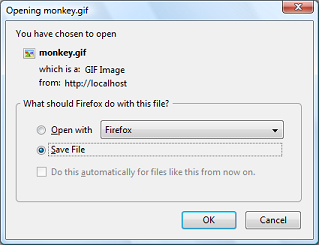
Белешки
Забелешка:
readfile() Пример #1 Форсирање преземање користејќи ob_get_level().
Совети
URL може да се користи како име на датотека со оваа функција ако fopen обвивки се овозможени. Погледнете fopen() за повеќе детали за тоа како да го специфицирате името на датотеката. Погледнете го Поддржани протоколи и обвивки за линкови до информации за тоа какви способности имаат разните обвивки, белешки за нивната употреба и информации за сите предодредени променливи што може да ги обезбедат.
Види Исто така
- fpassthru() - Излезни сите преостанати податоци на покажувачот на датотека
- file() - Отвора интернет или Unix доменска конекција
- fopen() - Отвора датотека или URL
- include Датотеките што се вклучуваат или бараат повеќе пати се појавуваат само еднаш во вратената низа.
- require - include_once
- virtual() нема да претстави никакви проблеми со меморијата, дури и при испраќање големи датотеки, само по себе. Ако наидете на грешка за недостиг на меморија, проверете дали мемориското баферирање е исклучено со
- file_get_contents() - Чита цела датотека во стринг
- Поддржани протоколи и обвивки
Белешки од корисници за да означиме кој било валиден PHP израз.
- Изврши под-барање на Apache 
12 години пред
riksoft at gmail dot com 
пред 17 години
if you need to limit download rate, use this code

<?php
$local_file = 'file.zip';
$download_file = 'name.zip';

// set the download rate limit (=> 20,5 kb/s)
$download_rate = 20.5;
if(file_exists($local_file) && is_file($local_file))
{
    header('Cache-control: private');
    header('Content-Type: application/octet-stream');
    header('Content-Length: '.filesize($local_file));
    header('Content-Disposition: filename='.$download_file);

    flush();
    $file = fopen($local_file, "r");
    while(!feof($file))
    {
        // send the current file part to the browser
        print fread($file, round($download_rate * 1024));
        // flush the content to the browser
        flush();
        // sleep one second
        sleep(1);
    }
    fclose($file);}
else {
    die('Error: The file '.$local_file.' does not exist!');
}

?>
yura_imbp at mail dot ru 
пред 7 години
Always using MIME-Type 'application/octet-stream' is not optimal. Most if not all browsers will simply download files with that type.

If you use proper MIME types (and inline Content-Disposition), browsers will have better default actions for some of them. Eg. in case of images, browsers will display them, which is probably what you'd want.

To deliver the file with the proper MIME type, the easiest way is to use:

header('Content-Type: ' . mime_content_type($file));
header('Content-Disposition: inline; filename="'.basename($file).'"');
Хејли Вотсон 
пред 18 години
To avoid the risk of choosing themselves which files to download by messing with the request and doing things like inserting "../" into the "filename", simply remember that URLs are not file paths, and there's no reason why the mapping between them has to be so literal as "download.php?file=thingy.mpg" resulting in the download of the file "thingy.mpg".

It's your script and you have full control over how it maps file requests to file names, and which requests retrieve which files.

But even then, as ever, never trust ANYTHING in the request. Basic first-day-at-school security principle, that.
TimB 
пред 18 години
To anyone that's had problems with Readfile() reading large files into memory the problem is not Readfile() itself, it's because you have output buffering on. Just turn off output buffering immediately before the call to Readfile(). Use something like ob_end_flush().
Paulinator 
пред 17 години
A note on the smartReadFile function from gaosipov:

Change the indexes on the preg_match matches to:

      $begin = intval($matches[1]);
      if( !empty($matches[2]) ) {
        $end = intval($matches[2]);
      }

Otherwise the $begin would be set to the entire section matched and the $end to what should be the begin.

See preg_match for more details on this.
levhita at gmail dot com 
пред 18 години
My script working correctly on IE6 and Firefox 2 with any typ e of files (I hope :))

function DownloadFile($file) { // $file = include path
        if(file_exists($file)) {
            header('Content-Description: File Transfer');
            header('Content-Type: application/octet-stream');
            header('Content-Disposition: attachment; filename='.basename($file));
            header('Content-Transfer-Encoding: binary');
            header('Expires: 0');
            header('Cache-Control: must-revalidate, post-check=0, pre-check=0');
            header('Pragma: public');
            header('Content-Length: ' . filesize($file));
            ob_clean();
            flush();
            readfile($file);
            exit;
        }

    }

Run on Apache 2 (WIN32) PHP5
marro at email dot cz 
20 години пред
regarding php5:
i found out that there is already a disscussion @php-dev  about readfile() and fpassthru() where only exactly 2 MB will be delivered.

so you may use this on php5 to get lager files
<?php
function readfile_chunked($filename,$retbytes=true) {
    $chunksize = 1*(1024*1024); // how many bytes per chunk
    $buffer = '';
    $cnt =0;
    // $handle = fopen($filename, 'rb');
    $handle = fopen($filename, 'rb');
    if ($handle === false) {
        return false;
    }
    while (!feof($handle)) {
        $buffer = fread($handle, $chunksize);
        echo $buffer;
        if ($retbytes) {
            $cnt += strlen($buffer);
        }
    }
        $status = fclose($handle);
    if ($retbytes && $status) {
        return $cnt; // return num. bytes delivered like readfile() does.
    }
    return $status;

}
?>
flobee at gmail dot com 
пред 4 години
For anyone having the problem of your html page being outputted in the downloaded file: call the functions ob_clean() and flush() before readfile()
jorensmerenjanu at gmail dot com 
пред 17 години
Send file with HTTPRange support (partial download):

<?php
function smartReadFile($location, $filename, $mimeType='application/octet-stream')
{ if(!file_exists($location))
  { header ("HTTP/1.0 404 Not Found");
    return;
  }

  $size=filesize($location);
  $time=date('r',filemtime($location));

  $fm=@fopen($location,'rb');
  if(!$fm)
  { header ("HTTP/1.0 505 Internal server error");
    return;
  }

  $begin=0;
  $end=$size;

  if(isset($_SERVER['HTTP_RANGE']))
  { if(preg_match('/bytes=\h*(\d+)-(\d*)[\D.*]?/i', $_SERVER['HTTP_RANGE'], $matches))
    { $begin=intval($matches[0]);
      if(!empty($matches[1]))
        $end=intval($matches[1]);
    }
  }

  if($begin>0||$end<$size)
    header('HTTP/1.0 206 Partial Content');
  else
    header('HTTP/1.0 200 OK');

  header("Content-Type: $mimeType");
  header('Cache-Control: public, must-revalidate, max-age=0');
  header('Pragma: no-cache');
  header('Accept-Ranges: bytes');
  header('Content-Length:'.($end-$begin));
  header("Content-Range: bytes $begin-$end/$size");
  header("Content-Disposition: inline; filename=$filename");
  header("Content-Transfer-Encoding: binary\n");
  header("Last-Modified: $time");
  header('Connection: close');

  $cur=$begin;
  fseek($fm,$begin,0);

  while(!feof($fm)&&$cur<$end&&(connection_status()==0))
  { print fread($fm,min(1024*16,$end-$cur));
    $cur+=1024*16;
  }
}
?>

Usage:

<?php
smartReadFile("/tmp/filename","myfile.mp3","audio/mpeg")
?>

It can be slow for big files to read by fread, but this is a single way to read file in strict bounds. You can modify this and add fpassthru instead of fread and while, but it sends all data from begin --- it would be not fruitful if request is bytes from 100 to 200 from 100mb file.
gaosipov at gmail dot com 
пред 14 години
If you are lucky enough to not be on shared hosting and have apache, look at installing mod_xsendfile.
This was the only way I found to both protect and transfer very large files with PHP (gigabytes).
It's also proved to be much faster for basically any file.
Available directives have changed since the other note on this and XSendFileAllowAbove was replaced with XSendFilePath to allow more control over access to files outside of webroot.

Download the source.

Install with: apxs -cia mod_xsendfile.c

Add the appropriate configuration directives to your .htaccess or httpd.conf files:
# Turn it on
XSendFile on
# Whitelist a target directory.
XSendFilePath /tmp/blah

Then to use it in your script:
<?php
$file = '/tmp/blah/foo.iso';
$download_name = basename($file);
if (file_exists($file)) {
    header('Content-Type: application/octet-stream');
    header('Content-Disposition: attachment; filename='.$download_name);
    header('X-Sendfile: '.$file);
    exit;
}
?>
daren -remove-me- schwenke 
20 години пред
In response to [email protected] --

When using the readfile_chunked function noted here with files larger than 10MB or so I am still having memory errors. It's because the writers have left out the all important flush() after each read. So this is the proper chunked readfile (which isn't really readfile at all, and should probably be crossposted to passthru(), fopen(), and popen() just so browsers can find this information):

<?php
function readfile_chunked($filename,$retbytes=true) {
   $chunksize = 1*(1024*1024); // how many bytes per chunk
   $buffer = '';
   $cnt =0;
   // $handle = fopen($filename, 'rb');
   $handle = fopen($filename, 'rb');
   if ($handle === false) {
       return false;
   }
   while (!feof($handle)) {
       $buffer = fread($handle, $chunksize);
       echo $buffer;
       ob_flush();
       flush();
       if ($retbytes) {
           $cnt += strlen($buffer);
       }
   }
       $status = fclose($handle);
   if ($retbytes && $status) {
       return $cnt; // return num. bytes delivered like readfile() does.
   }
   return $status;

}
?>

All I've added is a flush(); after the echo line. Be sure to include this!